OIT News and Initiatives

Read Our Latest Articles

  • Zoom Room with Teams Image

    Audio Visual (AV) and Videoconferencing (VC) Update

    Feb 19, 2025
    Our teams have been working together to enhance our AV and videoconferencing capabilities. Starting February 24, Logitech Zoom Rooms can now connect to Teams Meetings via the Tap Controller. Additionally, we have streamlined the classroom computer experience by removing unnecessary applications, disabling non-essential settings, ensuring quicker startup times and seamless presentations. 
    Full story
  • Cisco phone display showing 136

    Enhancing Campus Communication: Upcoming Phone System Change

    Nov 12, 2024
    We are making a major upgrade to our campus calling system and transitioning to Microsoft Teams Voice in 2025. This cloud-based phone system will integrate with Microsoft Teams, allowing seamless calls directly within the app, enhancing both communication and collaboration. As part of this transition, several general-purpose phone numbers will be deactivated and reconfigured for emergency dialing only, ensuring a smooth and reliable upgrade to our new system.
    Full story
  • mini shopping cart on top of a keyboard with tech icons inside

    Introducing OnTheHub Software Store

    Oct 28, 2024
    Our new software store OnTheHub launched this month! Explore OnTheHub and take advantage of the new streamlined process for accessing essential software.
    Full story
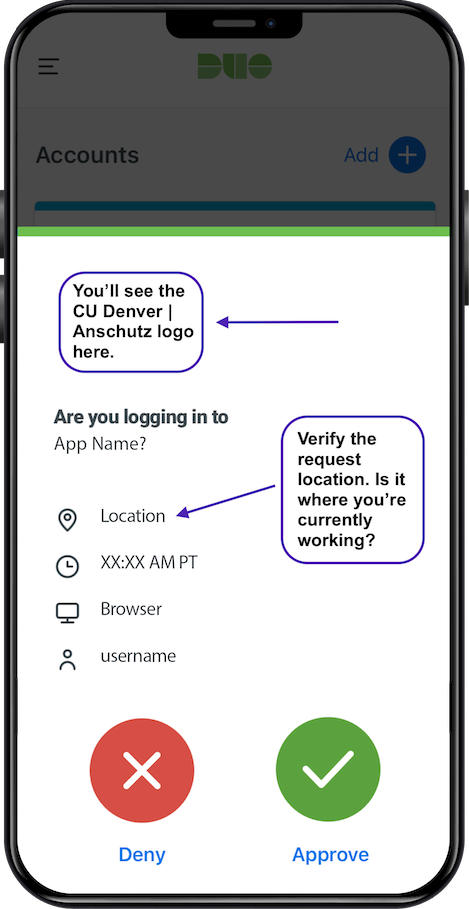
  • Duo prompt image with instructions

    Enhanced Security Measure: Password Reset

    Sep 25, 2024
    As communicated earlier this month, we are implementing several improvements to further protect our information and technology infrastructure, including a proactive password reset for all campus account holders.
    Full story
  • October is Cybersecurity Awareness Month writing in a blue and purple box

    Join the Multi-Campus Roundtable on Tuesday, October 15

    Sep 25, 2024
    Join the virtual cybersecurity roundtable discussion at noon on Tuesday, October 15. It is a free one-hour event — all faculty, staff and students are encouraged to attend. Learn about best practices for protecting your information, identifying phishing scams, choosing secure passwords and how to stay secure while using the growing AI technologies.
    Full story
  • Picture of the back of a meeting while attendees look at a presentation on a screen with OIT AV support managing it.

    Classroom Technology Modernization

    Aug 12, 2024
    The project team is excited to announce that 17 room upgrades have been completed on the CU Anschutz campus to standardize and optimize each room technology experience.
    Full story
  • EE Spotlight white type on gold image with ISS logo

    Employee Spotlight

    Aug 1, 2024
    Within ISS we value our team members and the phenomenal work they do for the university. Learn more about Kevin Fotso, a bioinformatics technical analyst supporting high performance computing on the CU Anschutz campus.
    Full story
  • laptop on table with orange circles surrounding it

    Ensuring a Seamless and Secure Start to Fall – Working, Teaching and Learning

    Aug 27, 2024
    Kick off the year on the right foot! Ensure your university password is up to date, and that your computer's applications, operating systems and software are all current. When accessing university resources, remember to have your username, password, and device ready for Multi-factor Authentication (MFA) with Duo.
    Full story
  • Arms and hands meeting in the middle across a table with computers

    Campus Digital Accessibility Initiative

    Jul 23, 2024
    The university is committed to upholding the principles of Colorado House Bill 21-1110, ensuring that people with disabilities have equal, available and reliable access to the university’s services, digital content and technologies. Learn more about digital accessibility at CU Anschutz.
    Full story
  • computer showing the Outlook logo on the screen

    Improving Microsoft Outlook Security

    Jul 29, 2024
    In our continuing efforts to improve email security protocols and protect our personal and university data, we are enabling additional features in Microsoft Outlook. The next phase in enhancing the security of our email environment involves enabling features that detect messages that may appear to come from legitimate or trusted email addresses but are actually from malicious sources.
    Full story
  • Two men looking at storage servers in a blue tinted room

    New Lower Storage Rates and Improved Efficiency

    Jul 29, 2024
    We are excited to announce a reduction in pricing and an upgrade to our centralized file storage services (Isilon). Learn more about the new cloud-based system.
    Full story
  • AI words on black screen with glowing blue lights

    Unlocking the Power of AI: Enhancing Campus Technology with New Tools

    May 28, 2024
    Artificial Intelligence (AI) is reshaping the way we learn, research and innovate on higher education campuses. Learn more about the approved tools for university use.
    Full story
  • Adobe Firefly generated image of fresh color palletes

    New AI Tools Approved for University Use

    Mar 27, 2024
    Whether you are a student, faculty, researcher or staff member, university approved AI tools can offer valuable resources to support your academic and professional endeavors.
    Full story
  • Adobe stock pic of a person holding a cell phone in their hand showing the Microsoft Teams image

    Microsoft Teams Update – Coming April 1

    Mar 27, 2024
    Learn more about the new Microsoft Teams client being rolled out on April 1, 2024!
    Full story
  • Adobe Firefly generated image with researchers learning in a lab

    Reminders and Updates for Researchers

    Mar 27, 2024
    Browse the OIT researcher tools and services webpages to search for technology that will help you achieve your goals.
    Full story
  • Showing 16 - 30 of 41 results

Let Us Know

See information on the OIT website that needs updating? Let us know!

OIT Website Update Request

CMS Login