

Tools & Services

Browse tools, software and programs that have been vetted by our security and compliance team and are supported by our service desk.

Microsoft Outlook Email

Category: Email Office 365 OIT - Categories Software Audience: Faculty Staff Students
All email lives in the cloud at Microsoft 365 and is accessible from any device, anywhere. Benefits of using Outlook include increased mailbox sizes limits up to 50GB, online archive to store old email up to 100GB, capability to send attachments up to 25MB and unlimited storage in the public cloud.
Access Microsoft Outlook Email

Welcome to Microsoft Outlook

Microsoft Outlook is the only university-supported email client and is highly recommended for accessing your university email. In addition, OIT recommends installing the Microsoft 365 Outlook app on your mobile device from the iOS and Android App store.

The university uses Duo Security to provide multi-factor authentication before accessing Outlook. Use the Microsoft Outlook desktop or mobile application for easiest access to your email. Please note: If you use a web browser such as Chrome or Internet Explorer to access web mail, instead of the Outlook application, you will be challenged for MFA every time you open a new browser session. For convenience, OIT suggests installing the Outlook application on your mobile and personal devices so you're only prompted to authenticate about every 90 days.

Shared Email Boxes

Information about requesting and using a Shared Mailbox is available on the OIT Email Boxes webpage. 

Email Security Practices

OIT continues to enhance email security protocols because of the rise in cyberattacks against members of our university community. Visit the Encryption webpage to learn more about communicating securely with outside parties. It's up to all of us to keep our data and systems safe.

New Outlook Security Features - July 2024 Updates

Microsoft Defender Quarantine Notifications were enabled on July 20. Refer to the campuswide message about the update and the Quarantine Email Notifications webpage for additional information about Microsoft Defender Quarantine. In addition, two enhancements to the security of our email environment include first contact safety tips and authenticated sender tagging.
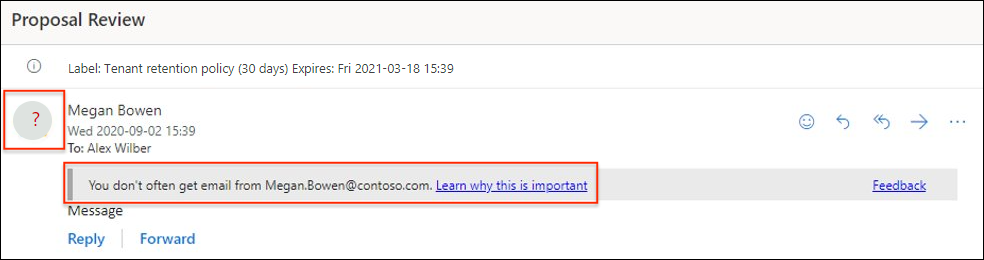
Example of new Outlook first contact security feature

Learn more in our newsroom. More information also is available from Microsoft:

Training Resources

Getting Started

H2 here, starting a main section.

Main sections in this template are separated by 10px, colored padding widgets. Integer ut facilisis felis. Integer porta felis odio. Sed venenatis nibh ex, faucibus facilisis nisl euismod vel. Sed blandit aliquam nibh rhoncus malesuada.

Sed venenatis nibh ex, faucibus facilisis nisl euismod vel. Sed blandit aliquam nibh rhoncus malesuada

This is really important.

Sed venenatis nibh ex, faucibus facilisis nisl euismod vel. Sed blandit aliquam nibh rhoncus malesuada.

Sed venenatis nibh ex, faucibus facilisis nisl euismod vel. Sed blandit aliquam nibh rhoncus malesuada

Click this link if you want to see something cool.

[tab 2 content - click edit to update]

Another H2 here, starting a new main section.

Let's do four columns this time. Main sections in this template are separated by 10px, colored padding widgets. Individual line items are separated by 1px padding widgets. Integer ut facilisis felis. Integer porta felis odio. Sed venenatis nibh ex, faucibus facilisis nisl euismod vel. Sed blandit aliquam nibh rhoncus malesuada.

Go ahead and click this

A calm, rocky mountain stream in Winter.

This is just an H3 to start a subsection.

Donec aliquet pulvinar felis, sit amet tempor orci lobortis eu. Duis sit amet metus efficitur, ornare risus nec, iaculis nunc. Suspendisse ut vehicula quam, vitae vehicula nisi.

Let's get something started here

Information Strategy and Services

CU Anschutz

Fitzsimons Building

13001 East 17th Place

Aurora, CO 80045


CMS Login