Tools & Services

Browse tools, software and programs that have been vetted by our security and compliance team and are supported by our service desk.

Coursera

Category: Academic Technology Instructional Technology OIT - Categories OIT - Type of software Software Audience: Faculty Researchers Staff Students
Coursera offers online courses and specializations taught by faculty across the CU system and is available at no cost to all faculty, staff and students. Courses are online and self-paced, so you can learn anywhere, anytime.

Welcome to Coursera

CU on Coursera offers online courses and specializations taught by faculty across the CU system and is available at no cost to all faculty, staff and students. In addition to more than 170 CU courses, the program offers expanded access to Coursera's top courses and specializations. Complete any course or specialization that interests you and earn a shareable certificate of achievement.

Benefit from a diverse range of educational offerings on subjects ranging from effective communication to cybersecurity and much more. Courses are online and self-paced, so you can learn anywhere, anytime.


Training Resources

Getting Started

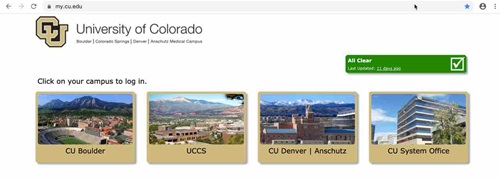
  • Log in to my.cu.edu and click on the CU Denver | Anschutz campus tile. 
    • Please note: If you have credentials at more than one campus, select only one set of credentials to use for CU on Coursera. 
    my.cu.edu log in image
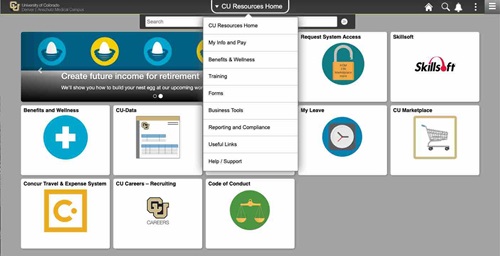
  • Open the CU Resources Home drop-down menu and select Training.

select training image

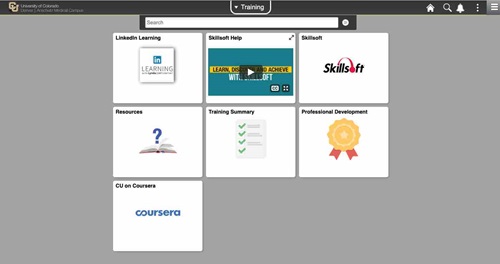
  • Select the CU on Coursera tile.

select CU on Coursera image

  • From the CU on Coursera homepage, click Join for Free.

select join for free coursera image

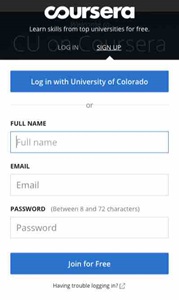
  • When the Log In / Sign Up window appears, complete your Full Name, Email and Password information to get started. 

coursera sign up image

  • After confirming your email address, you will be redirected to the Coursera website. Select from the collections of courses and start learning!

  • For more information and help using the website, visit the Coursera Learner Help Center.

H2 here, starting a main section.

Main sections in this template are separated by 10px, colored padding widgets. Integer ut facilisis felis. Integer porta felis odio. Sed venenatis nibh ex, faucibus facilisis nisl euismod vel. Sed blandit aliquam nibh rhoncus malesuada.

Sed venenatis nibh ex, faucibus facilisis nisl euismod vel. Sed blandit aliquam nibh rhoncus malesuada

This is really important.

Sed venenatis nibh ex, faucibus facilisis nisl euismod vel. Sed blandit aliquam nibh rhoncus malesuada.

Sed venenatis nibh ex, faucibus facilisis nisl euismod vel. Sed blandit aliquam nibh rhoncus malesuada

Click this link if you want to see something cool.

[tab 2 content - click edit to update]

Another H2 here, starting a new main section.

Let's do four columns this time. Main sections in this template are separated by 10px, colored padding widgets. Individual line items are separated by 1px padding widgets. Integer ut facilisis felis. Integer porta felis odio. Sed venenatis nibh ex, faucibus facilisis nisl euismod vel. Sed blandit aliquam nibh rhoncus malesuada.

Go ahead and click this

A calm, rocky mountain stream in Winter.

This is just an H3 to start a subsection.

Donec aliquet pulvinar felis, sit amet tempor orci lobortis eu. Duis sit amet metus efficitur, ornare risus nec, iaculis nunc. Suspendisse ut vehicula quam, vitae vehicula nisi.

Let's get something started here

Information Strategy and Services

CU Anschutz

Fitzsimons Building

13001 East 17th Place

Aurora, CO 80045


CMS Login