CU Anschutz Event Services Knowledge Base

Search the policies, logistics planning, and EMS FAQ's to help produce successful meetings and events at CU Anschutz.

Keyword Search

Filter results by:

Access and Use of Building Patios, Balconies, Decks and Roofs

Topic: Policies

This policy governs the safe and compliant use of outdoor spaces on campus, including patios, balconies, decks, and roofs. It outlines what activities are allowed, how spaces can be scheduled, and the safety requirements that must be followed.
Policy on patios, balconies, decks and roofs

Access Control - CU Anschutz Building & Room Entry

Topic: Policies

This policy addresses access to buildings and rooms for special events and the potential need for security/police support. It ensures the safety of people and property on campus by setting standards for building access, security systems, and restricted areas. This policy applies to all CU Anschutz buildings and spaces where the university controls access.

Complete policy on access control for CU Anschutz buildings

Accessibility

Topic: Planning Logistics
The University of Colorado Anschutz is committed to ensuring digital and physical accessibility for everyone, including people with disabilities. CU Anschutz Events must comply with campus accessibility standards.

Add a room to an event reservation

Topic: Using EMS

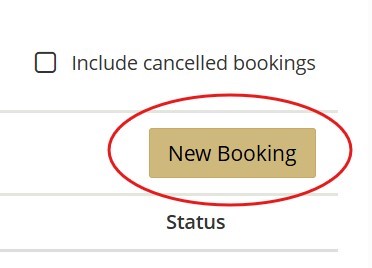
Additional rooms can be added to existing reservations to keep event details in one place. Navigate to the EMS Webapp, sign in, and then click on “My Events”. Click on the event to add a room to. Scroll to the bottom of the page and click “New Booking” on the right-hand side. Add the date, time, and search for the room to add to the reservation.

Screenshot of EMS scheduling system to indicate where the New Booking button is.

Alcohol Policy

Topic: Policies

This policy outlines the rules and approval process for serving or selling alcohol at university events or on university property. It ensures compliance with state liquor laws and campus safety standards.

Review the Fiscal Compliance website for specific guidance and next steps for including alcohol in a university event, either on or off campus.

Complete CU Anschutz alcohol policy

Animals on Campus

Topic: Policies
This policy outlines when animals can or can't be part of events and also provides guidance on service animals, therapy animals, etc. It also explains the responsibilities of individuals bringing animals to campus. The policy ensures health, safety, and compliance with ADA and university regulations.
Complete CU Anschutz animals on campus policy

Anschutz Health Sciences Building Benson Atrium LED screen guidelines

Topic: Planning Logistics

Events occurring during normal business hours are typically not permitted to override or interrupt standard screen programming. Existing content is curated carefully to align with the clinical environment and ongoing activities within the building.

To request use of the screen for an event, please email [email protected] for next steps.

Anschutz Health Sciences Building Benson Atrium Reservations

Topic: Planning Logistics
Due to the logistics required to operationalize the Benson Atrium in AHSB (setup, AV, etc.), Senior Administration has asked that event requests for use of the atrium space be limited to signature activities (like Match Day, Commencement, Donor Dinner, etc.).

If there are room options available for an event to be conducted in, Event Services has been instructed to schedule them in those spaces instead of using the Atrium.

Anschutz Health Sciences Building Catering

Topic: Planning Logistics Policies

TStreet Kitchen retains the first right of offer for all meeting and event catering in AHSB and the South Plaza. This means any event with catering must submit their catering request to TStreet.

If TStreet cannot accommodate the event needs (i.e. availability, menu options, budget), the event planner may contact other vendors for catering options. No additional steps or approvals are needed.

Catering is defined in this agreement as any service with servers and/or plated, passed, or buffet-style meals. It does not include simple meal drop-offs such as boxed lunches, pizza delivery, or fast-casual meals.

However, if the meal delivery includes setup or service, TStreet retains the catering right for the event.

AV Technology, Support and Training

Topic: Planning Logistics

Many CU Anschutz spaces include standard audio-visual technology that can accommodate most meetings and events. Equipment included in the rooms is listed in EMS.

Please email [email protected] for any inquiries regarding event space technology and AV training or walkthroughs.

Cancel a booking date or room

Topic: Using EMS

A single room or date in a large event or recurring series can be cancelled.

To cancel, go the EMS Webapp, sign in, and then click on “My Events”. Click on the event from the list.

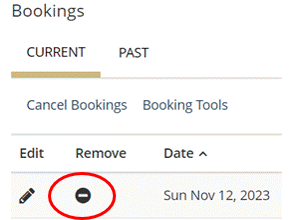
Scroll down to the bottom of the page, to view the list of specific booking dates and room. To cancel individual bookings one at a time, click on the small “-“ symbol next to each date. To cancel multiple dates or rooms, use the "Cancel Bookings" option.

If the reservation includes services, the cancellation options will not appear if it is within a certain cutoff date, which varies by service. If the option does not appear, email [email protected] to request a cancellation. Service charges may apply if services have already been rendered.


Image of the EMS events screen and the hash sign to remove individual bookings.

Cancel a reservation or event

Topic: Using EMS

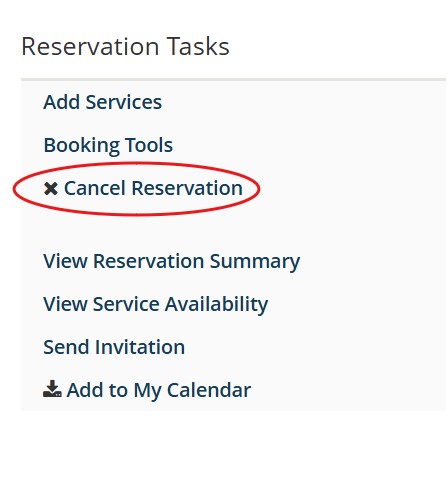
An event cancellation can be completed by going to the EMS Webapp, signing in, and then click on “My Events”. Click on the event from the list. On the right-hand side there will be the option to “Cancel Reservation”.

If the reservation includes services, the "Cancel Reservation" option will not appear if it is within a certain cutoff date, which varies by service. If the "Cancel Reservation" option does not appear, email [email protected] to request a cancellation. Service charges may apply if services have already been rendered.

Cancel reservation button in EMS is under Reservation Tasks in the event.

Combining reservations with multiple dates

Topic: Using EMS
If an activity requires multiple rooms over several dates (even if they're not in a pattern), the reservations can be combined into one request. This eliminates multiple email confirmations and saves time in the submission form.

This online This online guide (PDF) has the steps for completing recurring requests.

Conflict of Interest & Event Sponsorship

Topic: Policies

This policy governs the relationship between industry representatives and students, residents and faculty of CU Anschutz. In the case of events, this most often applies to giveaways, swag and catering.

Students, residents and faculty may not accept any personal gift from industry or its representatives, even if the gift is of nominal monetary value (zero dollar limit).  Pens, notepads, mugs, penlights, calipers, textbooks and free or discounted tickets to sporting events are examples of prohibited items. 

Students, residents and faculty may not accept or distribute promotional materials that bear the logo or name of the company. 

Meals, beverages, snacks or other hospitality paid for by industry or industry representatives shall not be provided to, or accepted by, students, residents or faculty.  

These prohibitions include all gifts, meals and other hospitality, even if offered after hours or at off-campus venues. 

The terms “industry” and “industry representatives” refer to all sales, marketing and other product-oriented personnel, even if they are not classified by the sponsoring company as participating in sales or marketing. All companies manufacturing drugs, medical devices, diagnostic testing equipment or supplies, nutritional supplements and other health-related products are included.

Questions about the policy can be directed to [email protected]

Event sponsorship, where a documented relationship that outlines sponsor levels and associated benefits is allowable. The event sponsor pays the sponsorship to the university entity, who in turn spends the funds on the event. To learn more about this process, contact [email protected]

Policy to limit conflicts of interest between health care professionals and industry representatives

Contracts

Topic: Planning Logistics

All event-related contracts must follow university procurement and contracting requirements. Employees are not authorized to sign contracts on behalf of the university, regardless of contract value.

Contract review and execution are managed through the Procurement Service Center (PSC). Additional guidance and resources are available on the PSC contracting website.

The Small Dollar Contract process may be used when payment will be made using a procurement card (PCard) or for contracts of less than $10,000.

For events that will be paid by check or are above $10,000, a Purchase Order (PO) must be requested through CU Marketplace. The contract should be uploaded and submitted in CU Marketplace for PSC signature and approval.

Deadlines to submit event support service requests in EMS

Topic: Planning Logistics Using EMS

Event request information should be input into EMS no later than 1 week in advance of the event date so staff can be scheduled. EMS has different lockout times for different services (48 hours in advance for A/V, 72 hours for parking, etc.), so planners can continue to make tweaks to service requests following the 1 week deadline as needed. Any requests for changes to services within the lockout period should be emailed directly to the service provider.

Event service providers on campus don’t receive notification of events until a service is added in EMS. So it never hurts to add some placeholder information after the reservation is confirmed so providers know to expect the event. Then, planners can continue to make updates in EMS once final details come together closer to event day.

All services are scheduled on a first-come, first-serve basis and on staff availability.

Edit a reservation date or time

Topic: Using EMS

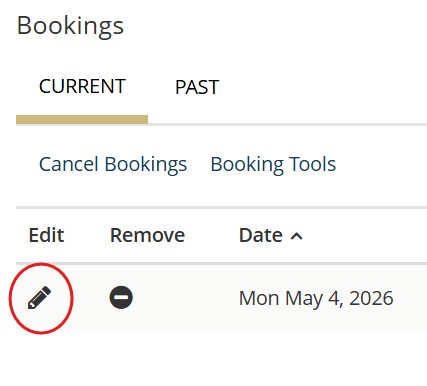
Submit the change request by going to the EMS Webapp, signing in, and then click on “My Events”. In the event, scroll down to the bookings and click on the pencil under “Edit”:

Make adjustments to the event date or time and the system will indicate if the room is available for the updated date/time request.

Screenshot of the EMS Scheduling website to indicate where the pencil is located to edit a booking.

Edit event details

Topic: Using EMS

Event titles display on digital screens across campus, so ensuring the title accuracy is important for wayfinding and the university image. Sometimes, event logistics change and initial reservation questions may need to be updated to indicate the event will now include food, alcohol, or new attendee types. Billing speedtypes can also be edited to ensure accurate invoicing.

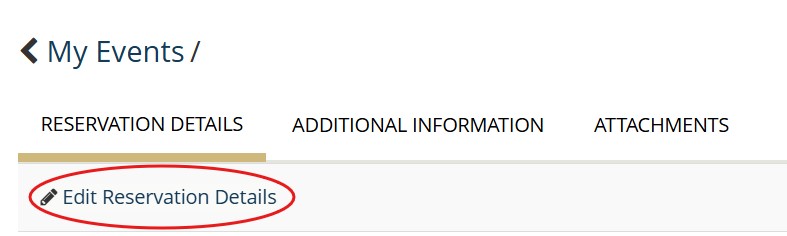
To make these edits to an existing reservation, navigate to "My Events", click on the specific reservation, and then click on "Edit Reservation Details" at the top of the screen.

From there, edit the reservation, click "Save Reservation Details", and updates will be saved.

An image of where to click

Edit requested support services in EMS

Topic: Using EMS

Here is a Quick Guide for how to add or edit services in EMS (PDF).

Revisit the reservation by going to the EMS Webapp, signing in, and then click on “My Events”. Once in the event, scroll down to the bottom of the page. The services that have been selected should display under each booking when “View Services” is clicked.

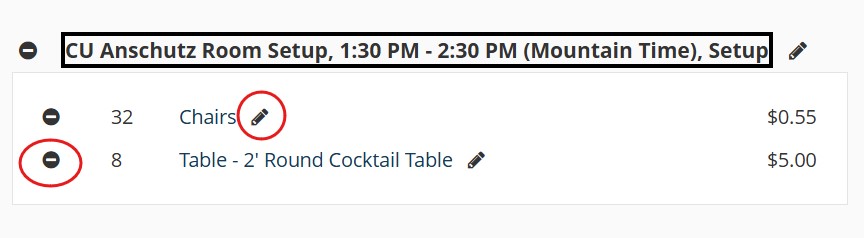
To edit already requested services, click "Manage Services". From there, the services that have already selected will be on the right-hand side. Click on the pencil next to the specific item to edit the quantity or comments of the item. One can also click the small “-“ symbol to delete an individual item.

Image of how to edit services in EMS by clicking the pencil icon or delete them using the hash symbol.

University Events

CMS Login