Data Visualization Accessibility

Overview


Data presented in tables, charts, graphs, and other visualizations should be formatted so it is accessible for all users.​

Key considerations for accessible data visualizations include design and color, labels and descriptions, multiple formats, and interactivity. (Source: Harvard University: Data Visualizations, Charts, and Graphs​)

Design and Color


Design

  • Use simple, clear designs that avoid animations.​
  • Do not overwhelm your audience with data. Focus on the key insights you want to communicate.​
  • Use appropriate font sizes and ensure the visualization can be resized.​

Color

  • Ensure sufficient color contrast between text, graphics, and backgrounds.​
  • Use accessible color palettes.​
  • Do no rely on color alone to convey meaning.
    • Use labels and shapes in addition to color.​

Chart Accessibility Comparison

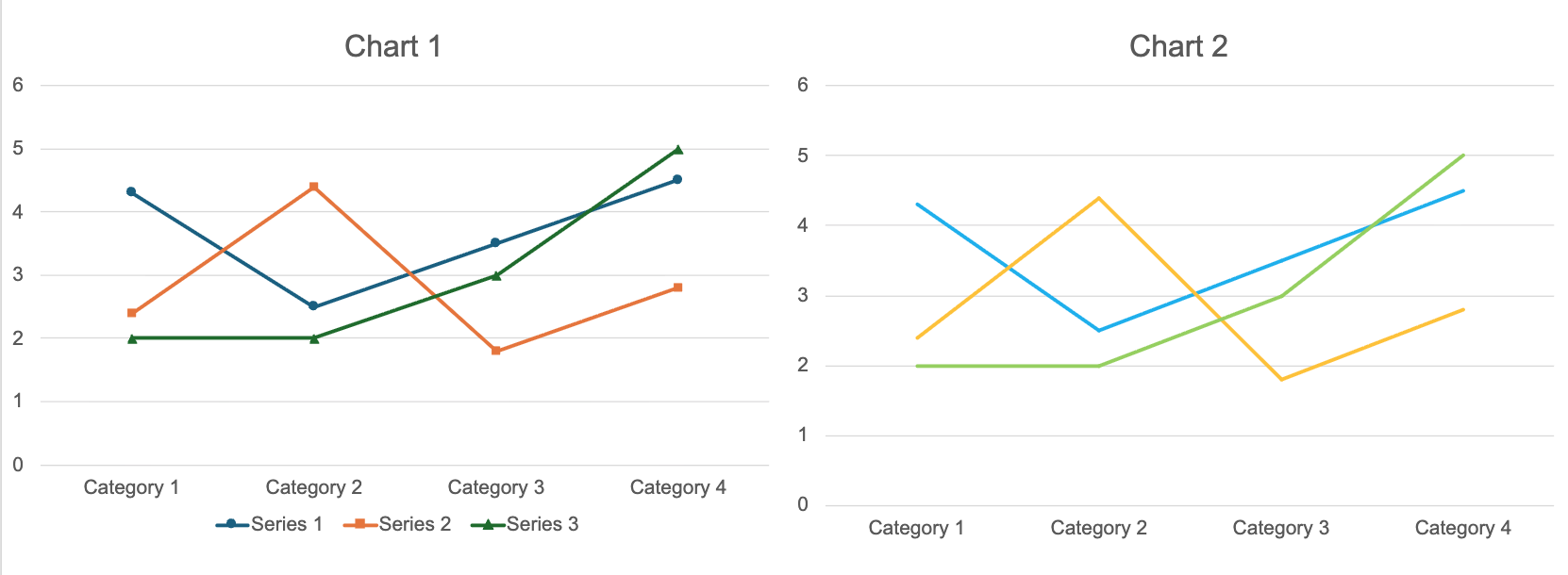
Which chart is more accessible?

Example Chart 1: 4 series of lines with different shapes and high contrast colors to indicate data points and a clear legend at the bottom.

Chart 1 uses shapes to indicate the series of each line (not just the color of the line) and includes a clear legend. It also has sufficient color contrast between the lines and white background.​

Imagine the charts are in grayscale; would you be able to understand Chart 2?
Labels and Descriptions


  • Clearly label titles, axes, and data points.​
  • Use legends to distinguish data.​
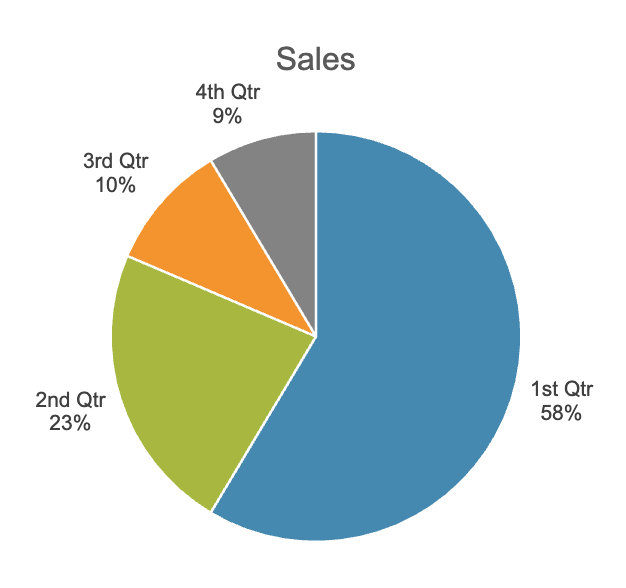
  • Include a short description (alt text) for simple visualizations or a long description for complex visualizations.​Example pie chart showing sales by quarter: 1st quarter 58%, 2nd quarter 23%, 3rd quarter 10%, 4th quarter 9%. There are clear labels for each section.

Example alt text for pie chart: "Sales by quarter: 1st quarter 58%, 2nd quarter 23%, 3rd quarter 10%, 4th quarter 9%.​"

Multiple Formats


  • Present data in multiple formats to support a variety of learning needs. Your audience can choose what works best for them.​
  • In addition to charts and graphs, share data as tables, spreadsheets, and/or text descriptions.​

Interactive Data Visualizations


  • Interactive data visualizations require additional accessibility considerations for keyboard-only and screen reader users.​ All data should be navigable using only a keyboard (no mouse) and screen reader tools should be able to read all data.​
  • Provide alternative formats when needed to ensure access to data.​

Power BI and Tableau Guides​


Additional Resources


CMS Login